Understanding XSS Attacks: Prevention & Protection Guide
Learn about XSS attacks, types, examples, and how to defend against them.

Understanding XSS Attacks: Prevention & Protection Guide

Hey folks!
Welcome back to the blog. Today, we’re diving deep into one of the most pervasive web vulnerabilities: Cross-Site Scripting (XSS). If you’ve ever wondered how attackers can hijack your browser or steal session cookies without touching your machine, this is the post for you. I’ll walk you through what XSS is, its types, real-world examples, and how to defend against it. Spoiler: it’s not as scary as it sounds, but you need to take it seriously.
TL;DR:
- XSS lets attackers inject malicious scripts into web pages.
- Types include reflected, stored, and DOM-based XSS.
- Prevention involves input validation, output encoding, and CSP headers.
- Tools like OWASP’s XSS Filter Evasion Cheat Sheet are essential for testing.
Understanding XSS: What is it?
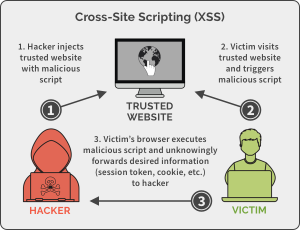
Let’s start with the basics. Cross-Site Scripting (XSS) is a web vulnerability where an attacker injects malicious scripts into a trusted website. These scripts run in the victim’s browser, allowing the attacker to steal data, hijack sessions, or perform actions on behalf of the user.
In simple words, XSS is like sneaking a harmful script into a website’s page, which then executes in the user’s browser. The attacker can do this by exploiting unvalidated user input, such as form fields, URLs, or cookies. For example, if a forum allows users to post unfiltered content, an attacker could inject a script that steals cookies when other users visit the post.
The OWASP Foundation explains this clearly: “XSS attacks occur anywhere unregulated user input is allowed to be posted to a trusted website.” This is why XSS is often found in bulletin boards, message boards, and comment sections.

Types of XSS Attacks
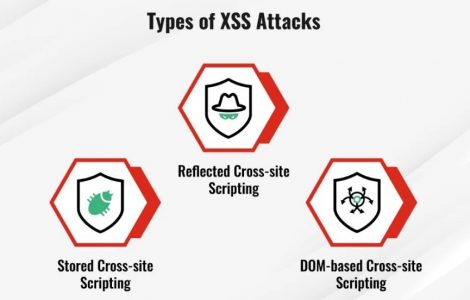
XSS isn’t a one-size-fits-all attack. It comes in three main flavors, each with its own attack vector and prevention strategy. Let’s break them down:
1. Reflected XSS
Reflected XSS occurs when an attacker injects a script into a URL parameter, which is then reflected back to the user without proper validation. This is common in search results or error messages.
Example:
If a user visits https://example.com/search?q=<script>alert('XSS')</script>, the script executes in their browser.
Code snippet:
<script>alert('XSS');</script>
Outcome: The script pops up an alert, but in a real attack, it could steal cookies or redirect the user.
2. Stored XSS
Stored XSS is when the malicious script is permanently stored on the target server. This happens when user input is saved in a database and displayed without sanitization.
Example:
A forum user posts a comment with <script>stealCookies()</script>. When another user views the comment, the script executes.
3. DOM-based XSS
DOM-based XSS occurs when the attack happens in the browser’s Document Object Model (DOM) rather than the server. This is often due to client-side JavaScript that doesn’t sanitize inputs.
Example:
A script like document.write(location.hash); could be manipulated to include malicious code.
Real-World XSS Examples
Let’s make this concrete. Here are a few real-world scenarios where XSS has caused major issues:
1. The Twitter XSS Vulnerability (2010)
In 2010, Twitter had a reflected XSS vulnerability in its search feature. Attackers could inject scripts into search queries, which would execute in users’ browsers. This allowed stealing session cookies and hijacking accounts.
2. The GitHub XSS Flaw (2021)
GitHub faced a stored XSS vulnerability where users could inject scripts into their profile pages. This allowed attackers to steal session tokens and impersonate users.
3. The Facebook XSS Bug (2017)
Facebook had a DOM-based XSS flaw in its Messenger app. Attackers could exploit this to inject scripts into chat messages, leading to cookie theft and session hijacking.
These examples show how XSS can impact even the most trusted platforms. The key takeaway? Never trust user input.
Preventing XSS Attacks
Prevention is the name of the game. Here’s how to secure your web apps against XSS:
1. Input Validation and Sanitization
Always validate and sanitize user input. Use libraries like HTML Purifier or DOMPurify to clean inputs.
Code snippet:
// Sanitize user input using DOMPurify
const cleanInput = DOMPurify.sanitize(userInput);
Outcome: This prevents malicious scripts from being executed.
2. Output Encoding
Encode user input before displaying it. For example, convert < to < and > to >.
3. Content Security Policy (CSP)
Implement a Content Security Policy (CSP) to restrict the sources of scripts. This can block unauthorized scripts from running.
Example CSP header:
Content-Security-Policy: script-src 'self' https://trusted-cdn.com;
4. Web Application Firewalls (WAFs)
Use WAFs like ModSecurity to detect and block XSS payloads. These tools can identify patterns like <script> and block requests.
Advanced XSS Mitigation Strategies
For developers, the battle against XSS isn’t over after basic prevention. Here are advanced strategies:
1. Context-Specific Encoding
Encode data based on where it’s used (e.g., HTML, URLs, JavaScript). For example, encoding a URL parameter differently than a script tag.
2. Secure Cookies
Use the HttpOnly and Secure flags for cookies to prevent theft via XSS.
3. Regular Security Audits
Use tools like OWASP ZAP or Burp Suite to scan for XSS vulnerabilities. The OWASP XSS Filter Evasion Cheat Sheet is a goldmine for testing.
4. User Education
Train developers to follow secure coding practices. XSS is often a result of poor input handling, not just a technical flaw.

Final Thoughts: Stay Vigilant
XSS is a classic example of why security can’t be an afterthought. It’s everywhere—forums, comment sections, even search bars. But with the right tools, practices, and mindset, you can mitigate these risks.
Remember: Input is your enemy. Always validate, sanitize, and encode. And don’t forget to keep your defenses updated.
Until then… happy hacking! Stay secure, folks.
Meta Description: Master XSS attacks: types, examples, and prevention strategies. Learn to secure your web apps from malicious scripts.