I Tried to Build a 24/7 Local AI Assistant on an M4 Mac Mini
I tried building a 24/7 local AI workflow on an M4 Mac Mini using OpenClaw, Ollama, and custom local LLMs. Here’s what worked, what failed, why OpenClaw felt slower than Ollama CLI, and why hybrid local + cloud AI is still the smartest setup.
I had a simple plan. Build a fully local AI assistant using OpenClaw + Ollama + local LLMs on an M4 Mac Mini with 24GB unified memory, connect it to my daily workflow, and stop burning API credits for every small task. Sounds clean, right? Yeah. Not exactly.
Before this, I tested OpenClaw on my separate M3 MacBook Pro with 16GB RAM, using Claude Code integration. That test was smooth. Agentic coding tasks executed flawlessly. Too smooth, actually. It gave me the confidence to go all-in. So my "genius" plan was buy a dedicated Mac Mini, migrate the entire stack locally using local LLM.
I rushed out and somehow managed to grab the last available 24GB M4 Mac mini on the island. Honestly, I was lucky. Every other Mac mini model was already sold out everywhere, and new stocks were expected to arrive only after maybe 2-3 months, depending on the model.
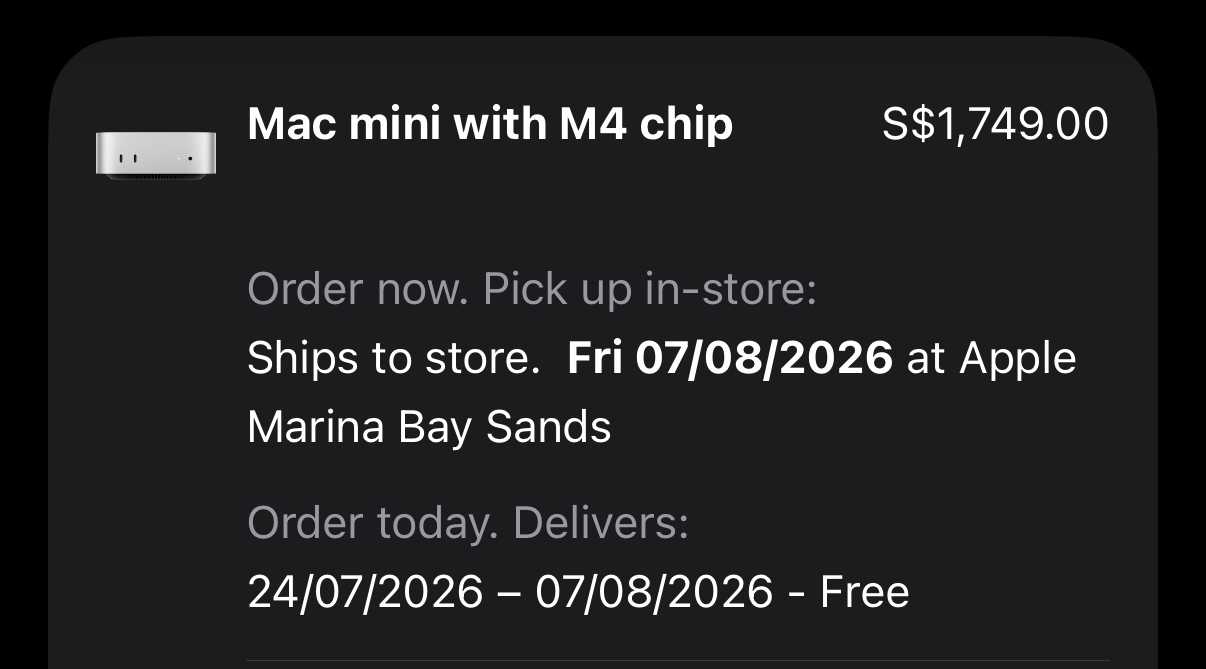
However, I grabbed it somehow, and then the real work started. I spent nights testing models, breaking configs, fixing RAM issues, pulling more models like Gemma, Qwen, Llama, Mistral, and DeepSeek, deleting them again, creating custom Modelfiles, changing context sizes, and trying to understand why a model that replies fast in ollama run becomes painfully slow inside OpenClaw.
This post is the honest version of that journey. No hype. No "local AI replaces everything" nonsense. Just what worked, what failed, and what I would recommend if you want to build the same kind of setup.
TLDR
If you want to build OpenClaw on a 24GB RAM M4 Mac Mini, my honest answer is:
- Yes, it works.
- No, it is not plug-and-play.
- Local models are good for many tasks, but they do not fully replace cloud models for heavy reasoning, long agentic workflows, or complex development work.
- You must cap context size, control loaded models, and assign specific models to specific tasks.
- A hybrid setup is the best path: local models for daily/low-risk tasks, cloud models for planning, complex coding, and fallback.
- If you have development experience, building your own bridge between Discord/Telegram and Ollama may give you more control than forcing everything through OpenClaw.
- OpenClaw + local LLMs on 24GB M4 Mac Mini is possible, but the best setup is hybrid, not fully local.
The Hardware Math: Budgeting 24GB Unified Memory
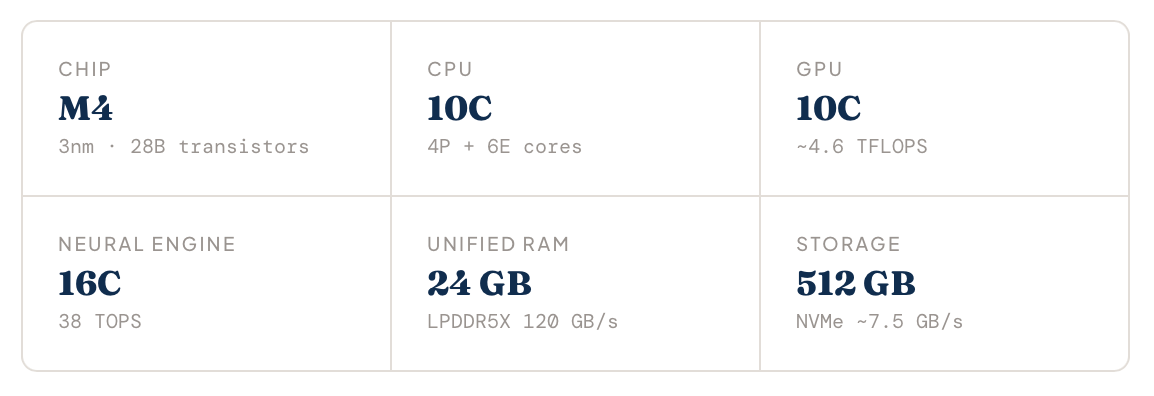
The important part here is 24GB unified memory. On paper, 24GB sounds like enough. In practice, you do not get the full 24GB for the model. Apple Silicon shares memory pools dynamically between the CPU, GPU, and Neural Engine. But just because you have 24GB on the box doesn't mean you can load a 20GB model file. macOS needs memory. Ollama needs memory. OpenClaw needs memory. Your shells, browsers, daemons, logging, and background services also need memory.
That means any model around 15GB+ runtime memory must be handled carefully. This is where most people get burned.
The First Mistake: Thinking Local LLMs Behave the Same Everywhere
When I pulled the models and tested them directly with ollama run <model>, everything looked promising. Small models were fast, and some were super fast. llama3.2:3b felt almost instant for simple responses. Even bigger models like Qwen 14B were usable through the Ollama CLI, so naturally I thought, if it is fast in Ollama, it should be fast in OpenClaw too.
Wrong. The moment I connected those exact same models into OpenClaw, absolute disaster. Even a simple "Hi" sometimes became painfully slow. The UI would freeze silently for 20 to 30 seconds before slowly spitting out a response. At first, I thought the model was the problem, but after more testing, I do not think the model itself was the main issue. The real problem was the full OpenClaw workflow. After multiple sleepless nights digging through system metrics, I found the two root causes that were killing the performance.
Silent Context Caching & Unconstrained RAM Overflows
When I interacted directly through the terminal, Ollama used a modest default context window, so everything felt fast.
But OpenClaw is not just passing my "Hi" directly to the model. It works like an agentic gateway, silently wrapping my tiny input with system instructions, workspace rules, tool instructions, memory, previous chat history, schema rules, and routing logic before it reaches Ollama.
So that small "Hi" becomes a much larger prompt behind the scenes. More tokens mean more processing before the model even starts replying. And if streaming is not configured properly, it feels even worse because OpenClaw waits before showing anything in the UI.
For example, a 14B model loaded with a 32K context window can hit around 19GB to 20GB memory usage, which instantly blows past my 15GB safe ceiling. Then Apple Unified Memory quietly starts paging the excess into NVMe swap, and boom, performance goes downhill.
Hitting swap causes an immediate 10x to 16x drop in token generation speed. At that point, the system is not really computing anymore. It is choking on disk I/O. Ollama also tries to pre-allocate the maximum possible Key-Value (KV) cache, based on the model's theoretical limits.
Unbuffered Output Streams
Out of the box, some standard configurations wait until the LLM finishes the full generation before sending the response through the local API. So if a local model generates 500 tokens of background output at 20 tokens per second, guess what happens? You stare at a blank screen for 25 seconds, wondering whether OpenClaw is thinking, frozen, or already dead.
This is why direct Ollama can feel fast while OpenClaw feels painfully heavy. The model is not always the problem. The pipeline is the problem.
Architecture & Quantization: Finding the Sweet Spot
When you download local models, you will see names like Q8_0, Q6_K, Q5_K_M, Q4_K_M, and Q3_K_M. This is quantization. In simple words, quantization reduces the model size by storing model weights with lower precision.
Think about it like image compression. A high-quality image keeps more detail but uses more storage. A compressed image is smaller and faster to move around, but if you compress it too much, the quality drops.
Same story here. To stay safely within that 15GB VRAM ceiling while still keeping solid instruction-following performance, I quickly learned that choosing a model is not just about parameter size. You have to balance model architecture against quantization loss, because pushing for a bigger model means nothing if aggressive quantization destroys the output quality.
My rule is simple. For 14B and below, use Q8 when possible. For 22B and above, use Q4_K_M, because 24GB RAM is not magic.
Dense Models
A dense model is a neural network where every part of the model wakes up for every single token. In simple words, when you ask something, the entire model gets involved in processing that request.
That usually gives you stronger reasoning, more consistent outputs, and better general intelligence because the model is using all of its knowledge at once. But nothing comes free. Dense models eat more RAM or VRAM, build larger KV caches during inference, pull more power, and usually run slower on consumer hardware.
Models like Qwen3 14B, Qwen2.5-Coder 14B, and Llama 3 8B are good examples of dense transformer models.
Edge-Optimized Architectures
Edge-optimized architectures are built with local hardware in mind. Instead of brute-forcing every layer the same way, these models use smarter attention patterns, memory-efficient cache designs, hardware-aware optimizations, and sometimes hybrid layer structures to reduce compute without sacrificing too much quality.
The goal is simple. less memory, less power, faster token generation, and better real world performance on machines that do not have datacenter class GPUs.
This matters a lot on Apple Silicon, where efficient use of Unified Memory and Metal acceleration can make or break the experience. Models like Gemma are great examples of architectures built with edge efficiency in mind. In simple words, dense models are stronger but heavier, while edge-optimized models are faster, lighter, and usually a better fit for local hardware.
Model Testing: What I Tried
I tested almost everything I could get my hands on Gemma, Qwen, Llama, Mistral, DeepSeek, coder-focused models, community fine-tunes, quantized variants... pretty much anything that looked promising.
And that is where the real pain started, because model selection is not just about "which model is the smartest". You have to think about model size, quantization, context length, runtime RAM usage, task type, generation speed, instruction-following quality, OpenClaw overhead, tool-calling reliability, and whether you need coding, writing, summarization, or deep reasoning.
A model can feel amazing in direct chat but completely fall apart inside an agent workflow. A model can be insanely fast but unreliable. Another model can be brilliant but so slow that you will never use it in daily work. That is when I stopped chasing one "best model". Instead, I started building task-specific models.
My Custom Models
These are the custom models I created for OpenClaw-style usage.
You can pull and test them:
## ------------------| Pull custom models
ollama pull h4rithd/buddy:8b
ollama pull h4rithd/thinker:14b-q8
ollama pull h4rithd/coder:14b
The Verdict: Why Hybrid is the Ultimate Workflow
Let’s be realistic. No open-weight local model that fits inside a 20GB memory footprint is going to reliably beat frontier cloud models for full-scale, multi-file agentic code generation. That is just the truth. Also, OpenClaw constantly adds deep system prompts, tool instructions, workspace state, and verification logic before the model even starts working, so trying to push complex operations fully through a local model can quickly become slow, heavy, and brittle.
For an M4 Mac mini, the most stable production-grade setup is a hybrid architecture. But still, if you really want to run everything through local LLMs, here is how I would assign models on a 24GB M4 Mac mini. My honest take is simple. Do not use one model for everything. That is how you end up with bad speed, bad quality, or sometimes both.
Local tier with Ollama should handle the fast and cheap stuff. quick conversational lookups, inline terminal formatting, small file summarisation, and local tool execution commands like curl, nmap, or basic scripting. This is where local models shine. No API cost, low latency, and good enough for daily lightweight tasks. Then keep the cloud tier, like Claude Code or Codex, for the heavy work.
When the request needs deep repository context, multi-file refactoring, or serious security review across a messy folder tree, OpenClaw can simply generate an execution instruction and trigger the standalone claude or codex directly inside the local filesystem.
This gives you the best of both worlds. Local weights handle the boring day-to-day operations fast and free, while the cloud model steps in with a massive context window and stronger reasoning when real development work begins.
I do not think local models under roughly this hardware class can consistently beat cloud models for complex work.
Production Setup: Configurations & Custom Models
To stop the memory bleeding and make the output feel much faster, I applied these production settings immediately.
macOS System Tuning
Prevent thermal throttling and stop macOS from forcing idle daemon execution states into sleep mode. Also, remember to set max loaded models to 1. On a 24GB RAM Mac mini, loading multiple large models at the same time is basically asking for memory pressure. Keeping only one model loaded and swapping models on demand may be slower during the switch, but overall, it is much more stable.
## ------------------| Disable sleep and power throttling
sudo pmset -a sleep 0 disksleep 0 powernap 0 tcpkeepalive 1 highstandbythreshold 95
defaults write NSGlobalDomain NSAppSleepDisabled -bool YES

## ------------------| Ollama environment
export OLLAMA_KEEP_ALIVE=-1 >> ~/.zshrc
export OLLAMA_FLASH_ATTENTION=1 >> ~/.zshrc
export OLLAMA_KV_CACHE_TYPE=q8_0 >> ~/.zshrc
export OLLAMA_MAX_LOADED_MODELS=1 >> ~/.zshrc
export OLLAMA_NUM_PARALLEL=1 >> ~/.zshrc
Dedicated Task-Specific Local Models
Rather than letting the system blindly juggle massive context buffers and burn through memory, I ended up building my own task-specific operational profiles on top of reliable local base models. Each one is tuned with a hard context cap 16,384 tokens for heavier workflows, or 8,192 for fast chat plus predictable temperature settings, so performance stays consistent and the system never drifts into swap hell.
h4rithd/buddy:8b (4.7 GB) - Built on Llama 3 8B with an 8,192 context limit. This is my primary lightweight model for real-time interaction, quick CLI syntax lookups, fast troubleshooting, and day-to-day conversational work. Small, responsive, and almost instant.
h4rithd/thinker:14b-q8 (15.0 GB) - Powered by Qwen3 14B q8_0, with the context window hard-capped at 16,384 tokens. I use this for structured writing, deep documentation analysis, architecture planning, and anything that needs slower but more thoughtful reasoning—without triggering NVMe paging.
h4rithd/coder:14b (9.0 GB) - Built on Qwen2.5-Coder 14B and dedicated for local script generation, payload development, exploit logic, automation, and targeted vulnerability assessment workflows. This one lives inside my coding workspace.
At that point, I stopped looking for one "perfect" model. I built models with jobs. That changed everything.
And this is only Phase 1. In the upcoming posts, I'll walk through the complete Python orchestration layer and show exactly how I bridged these optimized local models with Discord and Telegram listener bots to automatically triage alerts, parse tasks, and execute network security commands in real time. Until then… happy hacking, and see you in the next one.